
Google Tags Manager
Some Previous Works
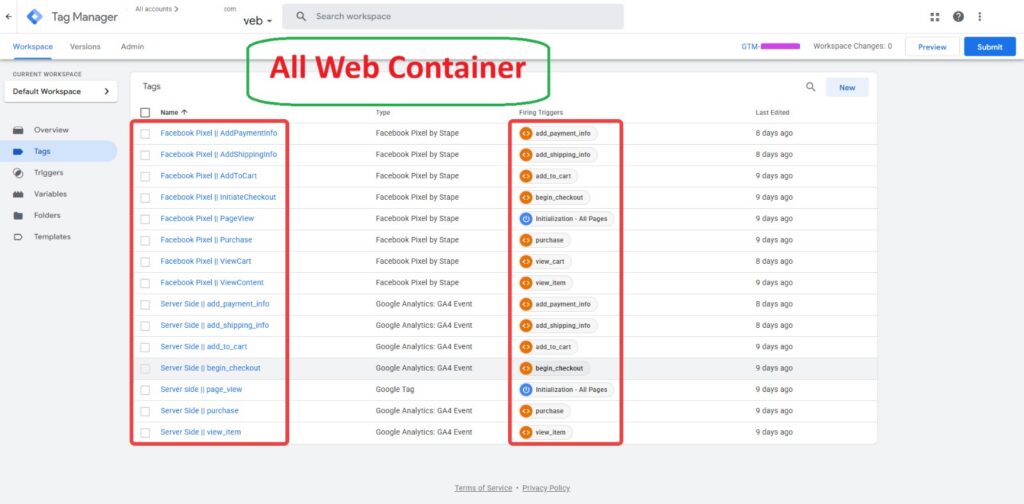
Advanced GTM Web Container Setup
Implemented a comprehensive tracking system using Google Tag Manager, GA4, Meta Pixel, and server-side tracking.
Configured key eCommerce events including PageView, ViewContent, AddToCart, ViewCart, and Purchase.
Set up dedicated triggers and tags for accurate event tracking across the customer journey.
Integrated server-side GA4 events to improve data reliability and measurement.
Validated the complete setup through GTM Preview and Tag Assistant to ensure all tags fired correctly.
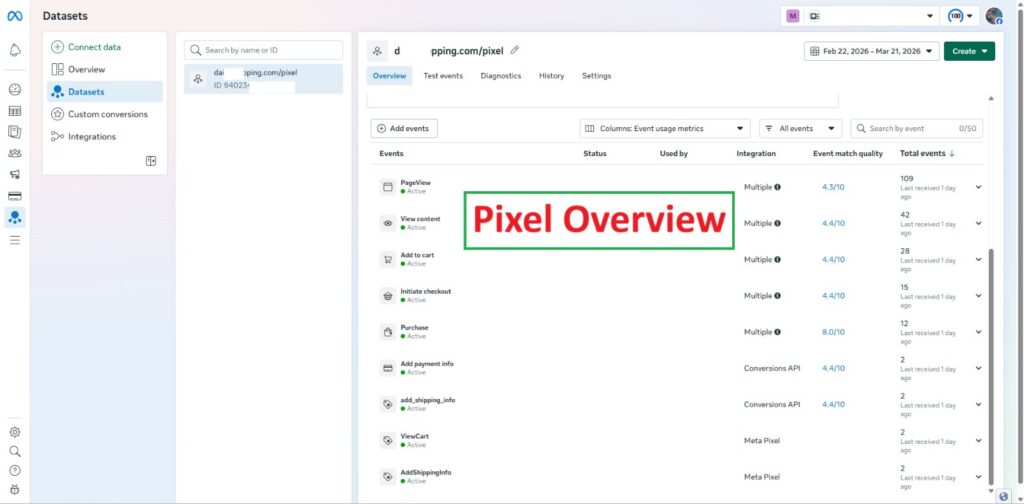
GTM & Server-Side Tracking Validation
Validated GA4, Meta Pixel, and server-side eCommerce tracking with successful event firing.
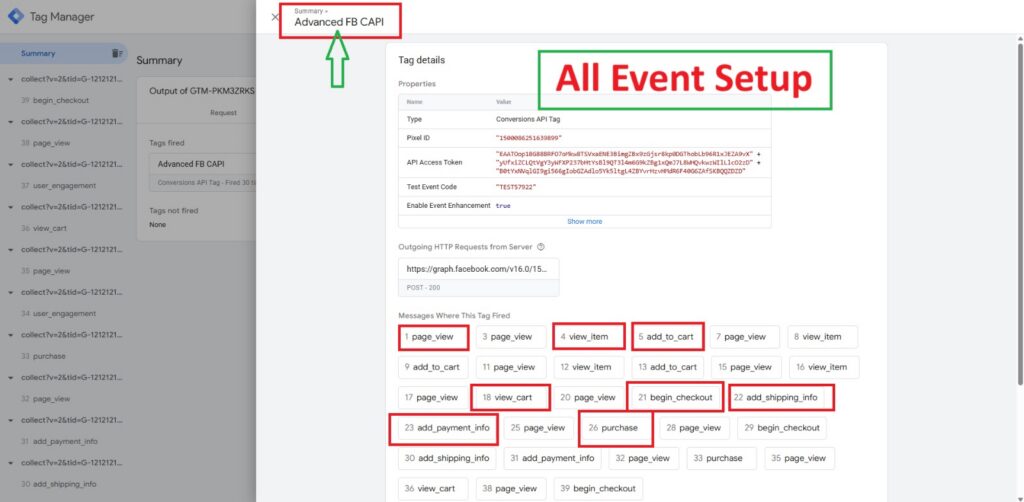
Meta CAPI Server-Side Tracking
Configured server-side event tracking using Google Tag Manager Server Container for Meta CAPI. Verified seamless tracking for key e-commerce events including
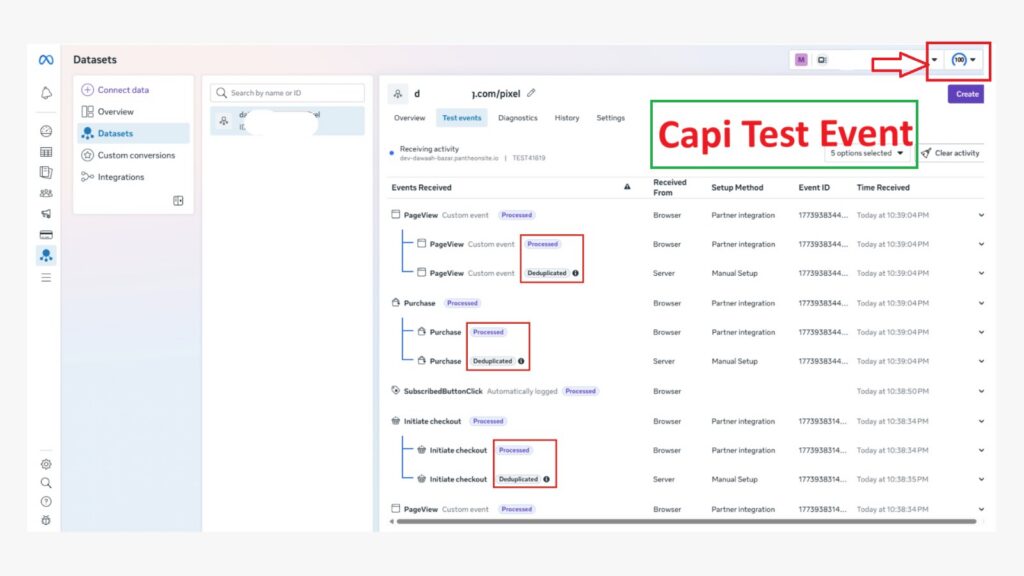
Meta CAPI Test Event & Deduplication
Implemented and tested Meta Conversions API (CAPI) for reliable conversion tracking.
Configured browser and server-side events for seamless data collection.
Verified key events including PageView, InitiateCheckout, and Purchase.
Tested Event ID matching to ensure proper browser-server deduplication.
Validated event processing through Meta Events Manager.
Meta Pixel Overview & Event Tracking
Implemented and monitored Meta Pixel for comprehensive website event tracking.
Configured key events including PageView, ViewContent, AddToCart, and Purchase.
Integrated Meta Pixel with Conversions API for enhanced data collection.
Reviewed event activity and Event Match Quality in Meta Events Manager.
Validated active events to support accurate conversion measurement and optimization.
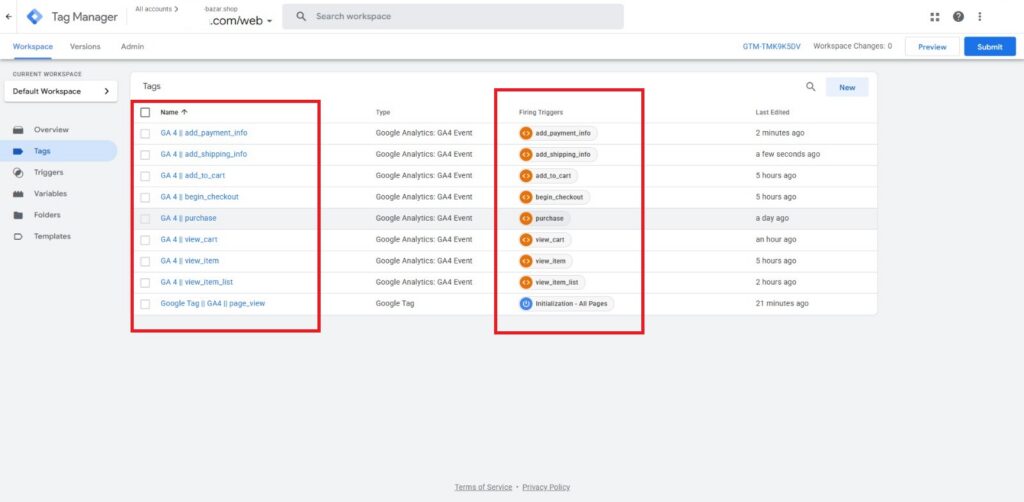
GA4 E-commerce Tracking Implementation
Implemented a complete GA4 e-commerce tracking setup using Google Tag Manager.
Configured key events including View Item, View Item List, Add to Cart, View Cart, and Begin Checkout.
Set up Add Payment Info, Add Shipping Info, and Purchase events for conversion tracking.
Created dedicated triggers and GA4 event tags for each stage of the customer journey.
Tested and validated the tracking setup using GTM Preview to ensure accurate event firing and data collection.
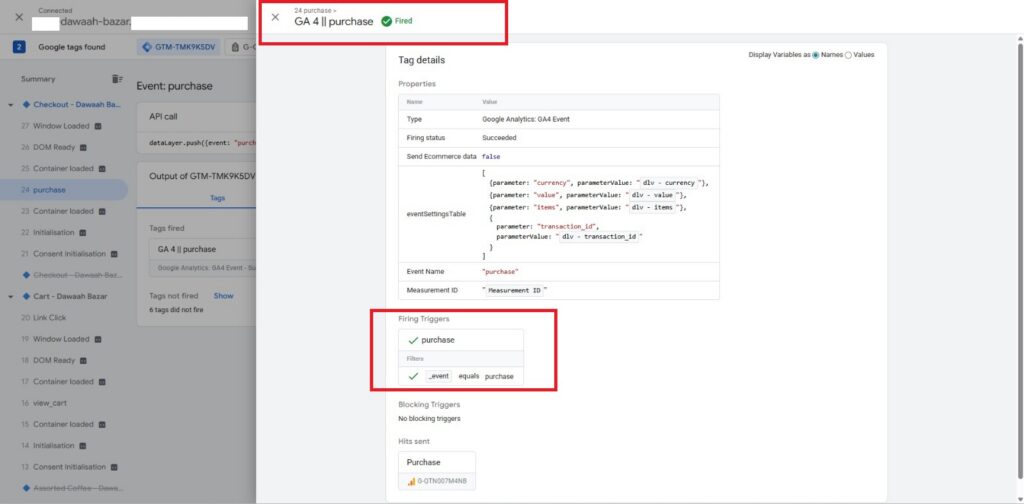
GA4 Purchase Event Tracking & Validation
Configured and validated the GA4 Purchase event through Google Tag Manager.
Implemented dynamic ecommerce parameters including transaction ID, value, currency, and product items.
Created a dedicated purchase trigger based on the data layer event.
Verified successful tag firing and confirmed the Purchase event was sent to GA4.
Tested the implementation in GTM Preview to ensure accurate conversion tracking.
Google Analytics 4
Some Previous Works
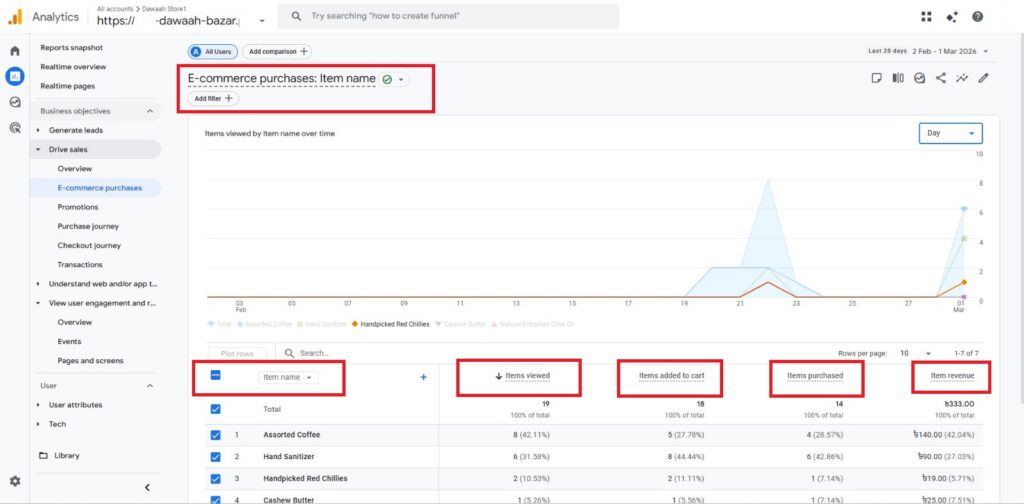
Google Analytics 4 E-commerce Purchases Tracking Set-Up
This report provides a clear view of item-level performance within Google Analytics 4 (GA4). It displays complete sales metrics for individual products, tracking key customer actions from product views to finalized orders. You can monitor core metrics such as Items viewed, Items added to cart, Items purchased, and total Item revenue for each product. It helps analyze product demand, track conversion performance across your store’s inventory, and optimize product listings based on real revenue data.
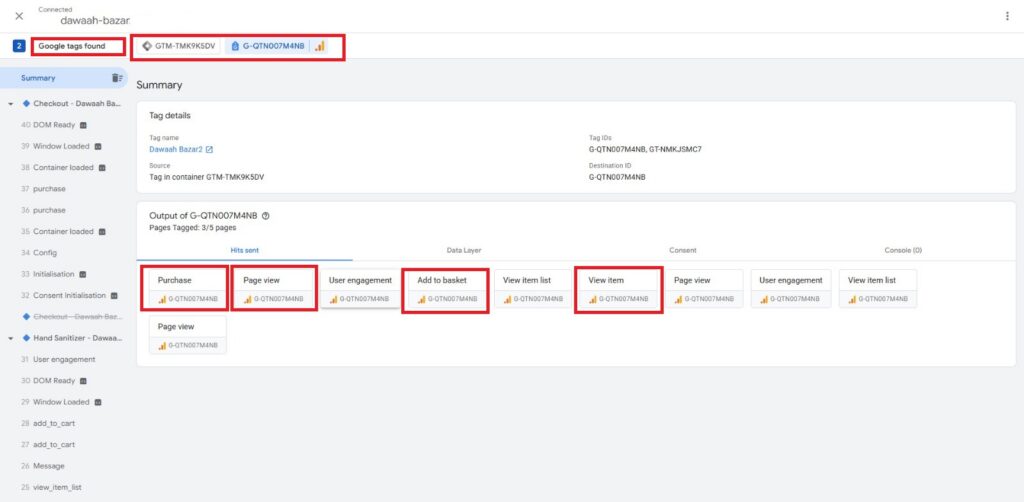
Google Tag Manager & GA4 E-commerce Tag Verification
This dashboard shows real-time event tracking and tag verification using Google Tag Assistant via Google Tag Manager. It confirms that key GA4 e-commerce tags—including Purchase, Page view, Add to basket, and View item—are firing correctly. By capturing critical interactions across the user journey, it ensures reliable tracking of visitor engagement and conversion data. This accurate data flow allows for seamless performance analysis and optimization inside Google Analytics 4.
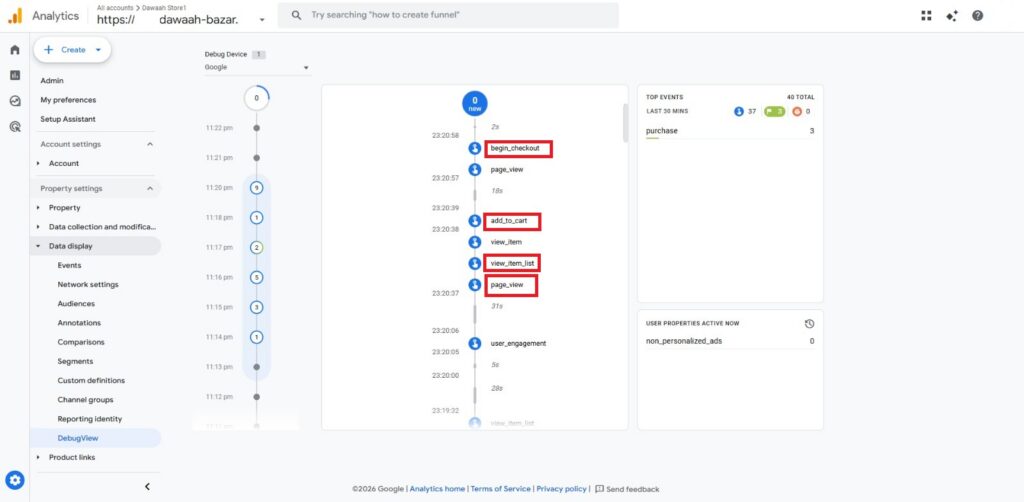
GA4 DebugView Event Stream & Real-Time Tracking Verification
This interface displays live event validation using the DebugView tool in Google Analytics 4. It confirms the step-by-step user journey by tracking crucial e-commerce events such as page_view, view_item_list, add_to_cart, and begin_checkout in real time. Testing through DebugView ensures that parameter data and event triggers execute accurately prior to publishing production tags. This live debugging process guarantees high data precision and seamless funnel analysis across the entire website.
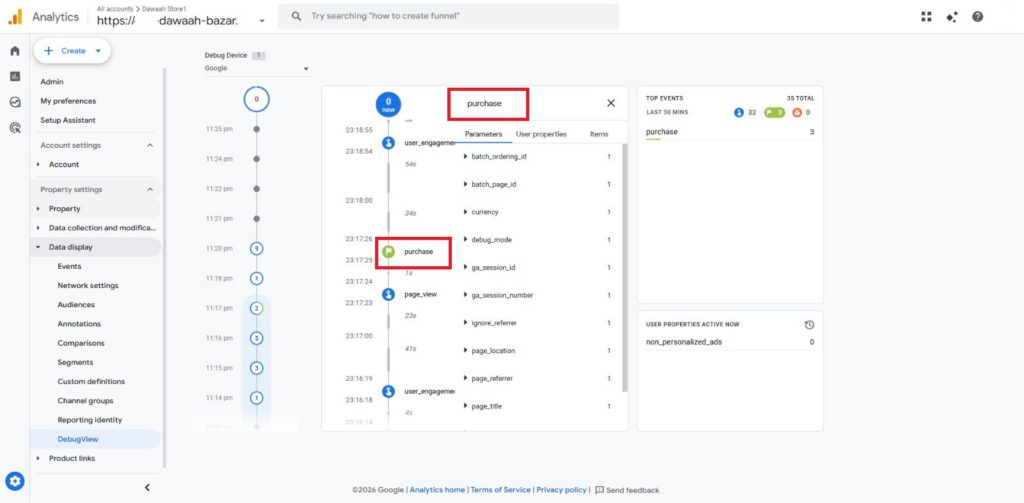
GA4 Purchase Event & Conversion Parameter Verification
This interface displays live verification of a successful conversion using the DebugView tool in Google Analytics 4. It captures the critical purchase event in real time along with its full list of associated tracking parameters. Important details such as currency, session IDs, page location, and user engagement are accurately passed into the analytics engine. Validating this final step guarantees complete tracking of transaction data, revenue attribution, and overall e-commerce performance.
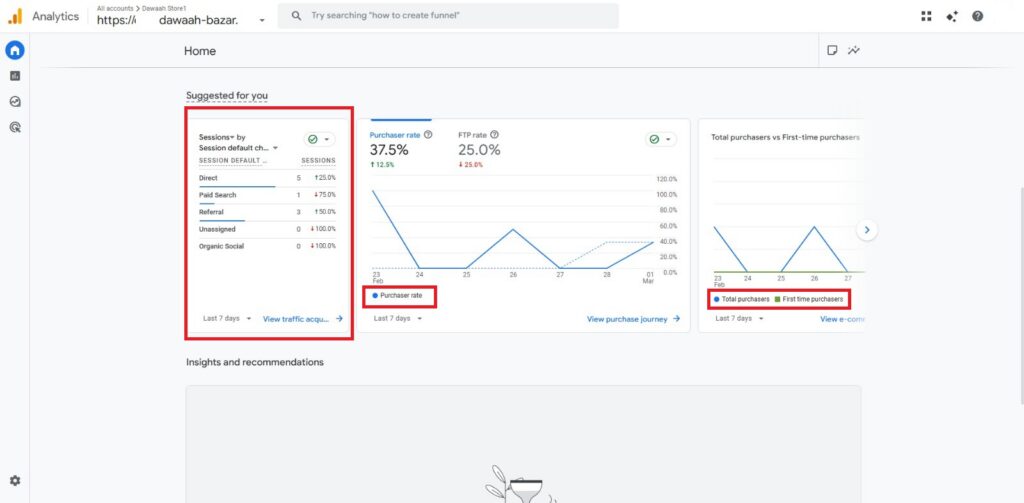
GA4 Traffic Acquisition & Conversion Rate Overview
This dashboard provides a high-level summary of store traffic performance and customer conversion trends inside Google Analytics 4. It highlights session distribution across default channel groups—such as Direct, Paid Search, and Referral—to show where visitors originate. Key performance metrics including Purchaser rate, First-time purchaser (FTP) rate, and user acquisition trends are tracked over time. Monitoring these indicators helps evaluate the effectiveness of marketing channels and optimize sales conversion strategies.
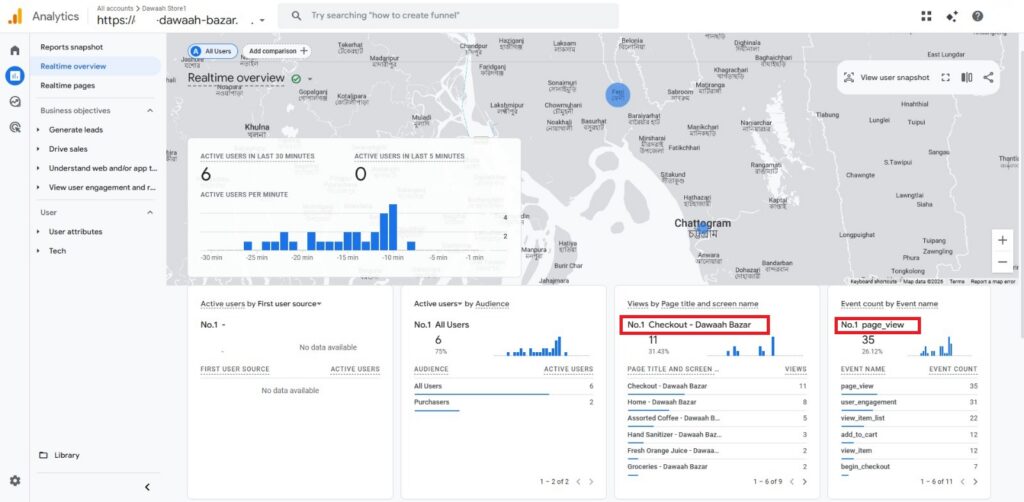
GA4 Realtime Overview & Live Geographic User Activity
This report illustrates live site engagement using the Realtime overview dashboard in Google Analytics 4. It visualizes geographic user locations on an interactive map alongside minute-by-minute visitor counts over the last 30 minutes. Key realtime metrics track top-performing pages—such as Checkout – Dawaah Bazar—and total event counts for actions like page_view, user_engagement, add_to_cart, and begin_checkout. Monitoring live user movement helps verify immediate traffic surges and validate instant campaign interactions across the platform.
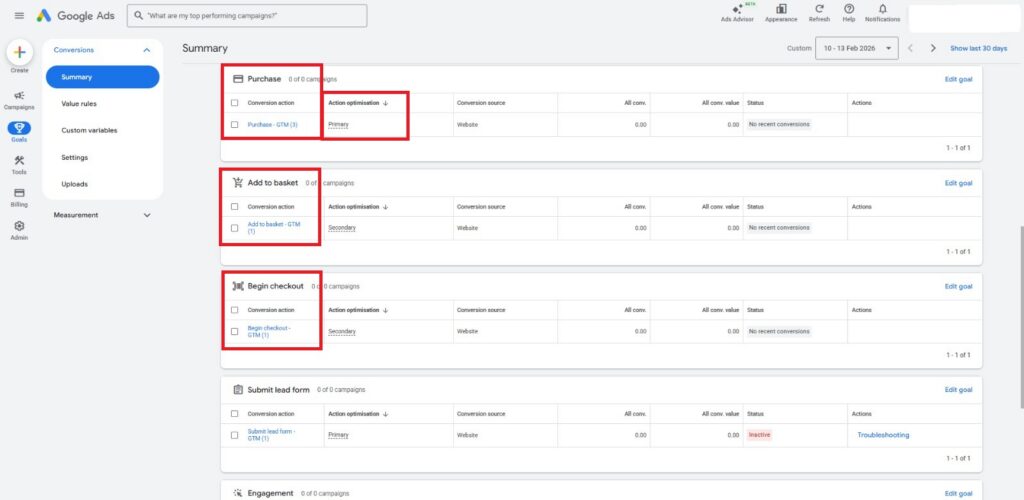
Google Ads Conversion Action Setup via Google Tag Manager
This dashboard shows configured e-commerce conversion goals inside the Google Ads summary interface. Key customer funnel events—including Purchase, Add to basket, and Begin checkout—are connected from the website via Google Tag Manager (GTM). Purchase is designated as a Primary action for bidding optimization, while micro-conversions like cart additions and checkout starts are tracked as Secondary actions. Setting up these structured conversion goals allows campaign algorithms to optimize ad spending toward maximum sales ROI.